Eons ago (~2013), my spouse suggested a mechanical keyboard as a gift idea for me. It was a good idea! By then I had pivoted from freelance miscellany to a steady programming job, and having nice tools for the trade seemed appropriate. I got a switch tester, I researched, and ended up selecting a WASD (spouse’s initial recommendation) V2 87-key / “tenkeyless” keyboard with Cherry MX Blue switches and a set of custom, etched-label keycaps in a custom blue/grey/orange color scheme.

At the time, the “buckling spring” IBM Model M was the consensus king of durable, classic keyboards with a great typing feel. Two intertwined aspects of that switch mechanism were said to be particularly important. First, that the switches had great tactile feedback when the spring “buckled” and snapped to trigger the contact; and second, that this tactile feedback was coincident with the switch activating (sending the “key got pressed” electrical signal). It was said that this allowed a frequent user to learn precisely how hard to press in order to activate the key without “bottoming out” and smashing the key to the low point of its available travel. The idea was that avoiding this shock would provide a gentler experience for your hands and fingers, and maybe even help to avoid repetitive stress injuries from typing.
I had had some wrist issues from computer programming by that point, so for my keyboard I picked the Cherry MX Blue switches because they, too, had strong feedback that was at least close to (if not precisely coincident with) the activation of the switch. Finely-made, durable, German, Cherry switches; n-key rollover (many keys can be “down” at once”); a solid, flex-free build; support for alternative layouts (e.g. Dvorak); the ability to replace key caps sometime in the future; just the right amount of stylistic flair: these were the reasons to get a mechanical keyboard at the time. I’ve never dipped my toe into alternative keyboard layouts, but otherwise those were my personal reasons for feeling ready to get a mechanical keyboard.
Typing Comfort
It remained a familiar and comfortable typing experience through the decade that I used it. In the beginning, I was coming from typing on laptops or other low-profile keyboards, and I remember it taking a little time to adjust to the relatively deep 4mm travel of the switches and the various angles of the (Cherry? OEM?) profile keys. But it did come to feel pretty comfortable. I’ve had fewer bouts of wrist issues, but I’m not sure how much credit the keyboard deserves for that. For me, I think the more important changes were working at a desk at a good height, not working on a laptop on a couch, and switching to a vertical mouse. As predicted by internet skeptics, I never got so precise with my typing as to be able to consistently avoid bottoming out the blue switches. But I do like the click and switch activation being in the middle of the switch’s travel. I can go several keystrokes at a time without hitting the key all the way down, and the rest of the time I think the feedback helps my fingers to have at least slowed down by that point.
WASD Etched Keycaps
The keycaps turned out not to be very high quality. The etched legends felt rough, especially at first. I thought that some kind of finishing could have helped with this, but tellingly I haven’t noticed similar etched keycaps from any other vendors, so it may just be impossible to do nicely. I also spent the first few years with my desk in a challenging environment, where the keyboard was in almost daily, direct California sunlight. This, I believe, seriously discolored the keycaps (most noticeably the blue and grey ones). They looked disgusting and I worried that I must have especially filthy hand sweat or something. No amount of dish detergent or other soaps would remove the “stain”, though, and I eventually figured out that this yellowing is the behavior of additives and coatings meant to protect plastic from UV light.
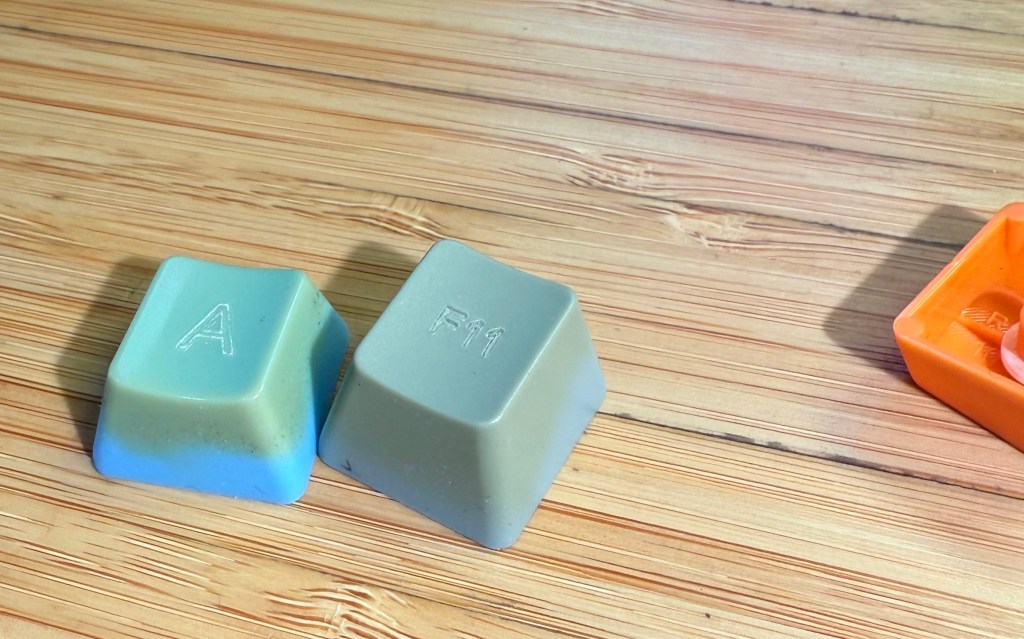
It was fun to pick a color scheme, to make some minor edits to the legends, and to have a keyboard that looked unlabeled like a simplified 3D rendering. At the time it felt like such customization was a major reason why one would buy a roughly $200 keyboard instead of just using whatever was lying around. But once I bought new keycaps the overall experience of the keyboard was much nicer.
Domikey Keycaps
In the Fall of 2020, the covid pandemic was still raging, my kids were not returning to in-person school, I was in full Super Dad mode trying to work from home while also making donuts and teaching kids to ride bikes and wrangling everyone up to Erie to hangout (masked!) on the beach. Depending on how that particular day was going, I was either ready to give myself a healthy little reward or so far gone that I was obsessively trawling mechanical keyboard forums to keep myself from screaming. So I bought fancy keycaps! I bought Domikey brand, doubleshot ABS plastic, SA* profile keycaps in the Classic Dolch color way. I love the “big centered letter” style of legends, the black/grey/red Dolch scheme felt like a subdued echo of my original grey/blue/orange, and I was sufficiently convinced by accounts on geekhack and r/MechanicalKeyboards to try the comparatively tall, sculpted, “SA” profile (or at least Domikey’s approximation of the canonical SA profile keycaps available from Signature Plastics).
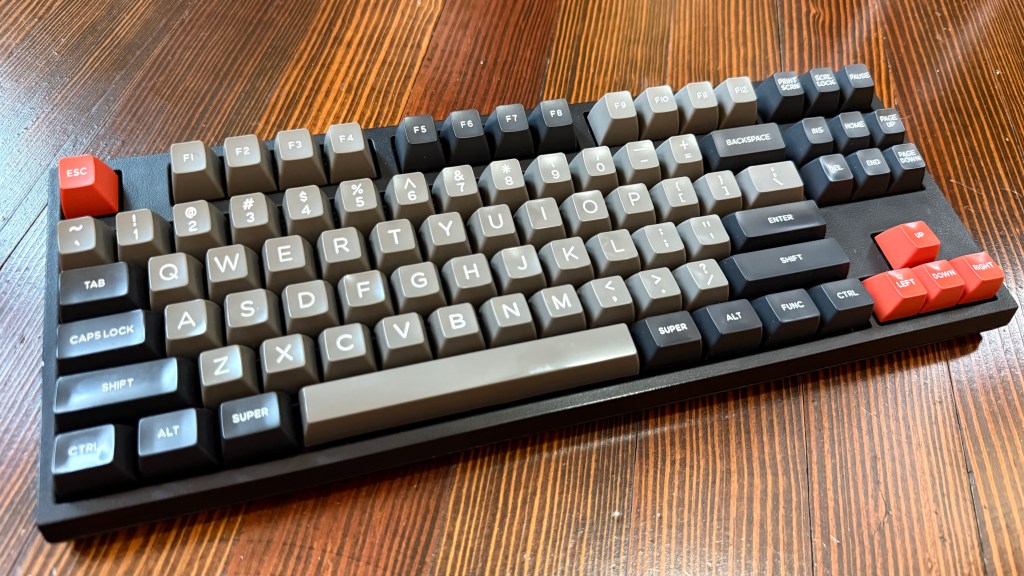
I love these keycaps. I think they look fantastic. After an adjustment period, the tall, spherical, not-technically-SA-profile keycap shapes felt more comfortable and easier for me to touch-type with than the original ones. The most unexpectedly welcome change, though, was their effect on the sound of the keyboard.
Click clack thock
In 2024, many conversations in the mechanical keyboard hobby read like an audiophile forum, with people creating and eliminating voids, applying greases, adding weights, adding or removing layers of foam to prevent or permit the transmission of vibrations, and selecting materials from polycarbonate to brass in the pursuit of ever more precisely defined acoustic profiles. That’s fine and good, but not particularly appealing to me. And yet! The deeper, mellower sound of my keyboard with the new keycaps was such an improvement over the thinly clicky sound of the original keycaps, that I, too, may end up stuffing a keyboard with bandaids and kinetic sand someday.
Wasdat Controller Board
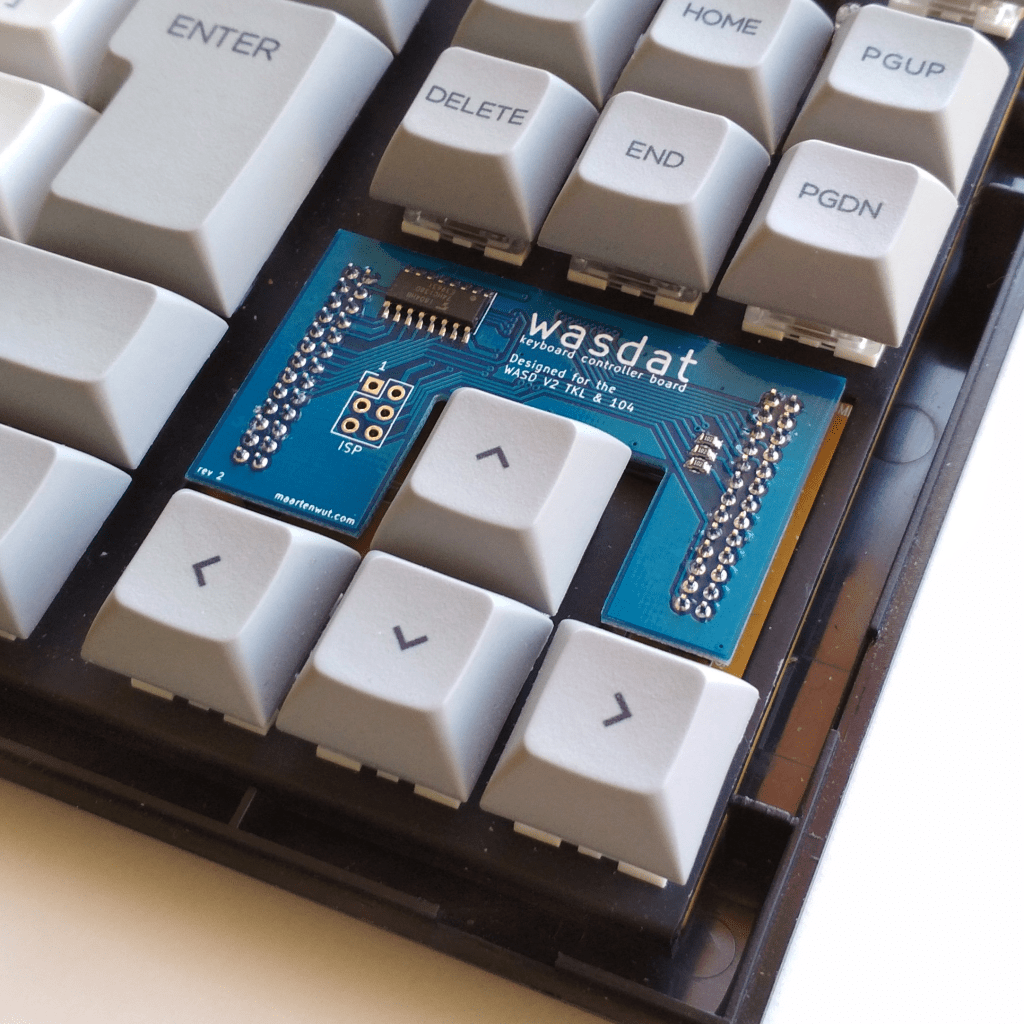
As part of the same 2020 “let’s upgrade this keyboard” impulse, I also bought a “Wasdat” (GitHub) replacement controller for it. This made the keyboard compatible with the powerful yet friendly VIA keyboard configuration software. Other than a tweak or two to the media keys, I didn’t end up taking much advantage of the flexibility this offered over the original configuration-by-DIP-switches. I will say that it was extremely cool and futuristic to pull a little circuit board out of its special little nook in the keyboard and replace it with a new one, and that ten minutes of feeling like I was an engineer on Star Trek was worth the ~$25. I’m not sure why WASD had the original controller on a daughterboard like this to begin with, but being able to easily upgrade it added to the professional feel of the keyboard. It’s probably not widely used, but I was disappointed to see that the successor V3 keyboards just have a soldered-in-place controller.
Decline Phase
By 2024, I started having issues with missed and doubled keystrokes. Inevitably, it seemed to affect keys I use frequently—Tab, “e”, and “o” were all pretty inconvenient to be unreliable. I was also growing tired of its clickiness—even its more muted, nicer-keycaps clickiness—while on Zoom calls. I later desoldered a few of the problematic switches and opened them up, and it looked to me like they were suffering from a decade of dust and hairs and other debris. I bought some new Cherry MX Blues to replace the problem switches with, but my crude soldering seems to have caused a problem where every so often a handful of keys will stop working for a minute or two.
While I was in there, I did also try stuffing some sheets of foam into the case, and it sounded and felt a bit nicer! Honestly I’m still a little tempted to buy one of the fancy aluminum cases WASD now sells—the plastic case is held together primarily with tabs that snap into place, and of course I broke one when opening it up to do the controller swap a few years back. This keyboard is sentimental to me, and in some ways I really like the idea of having and using a durable tool that’s old enough to attend middle school.
But I’m also worried that the “dead keys” issue is because I damaged the circuit board soldering in new switches. I don’t think computer programming is about typing all day, but I do enough typing that I need my keyboard to be a tool that I can rely on. So in the end, I did buy something new, but that’s a subject for a different post.
 Intended Effect
Leave a comment